Notification History
Not all notifications are logged, only those needed for updating messages or tracking changes. Up to 32 days is stored based on your privacy settings.
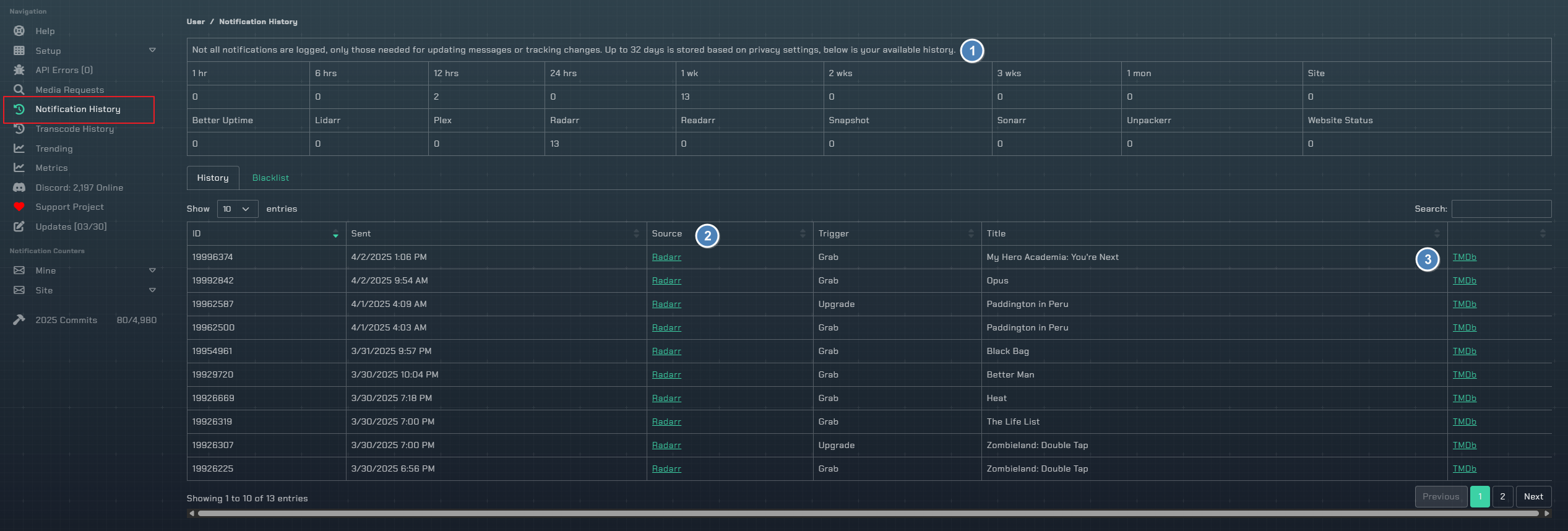
Statistics
The top of the page shows two summary tables:
Time-Based Breakdown
Notification counts broken down by time period: 1 hr, 6 hrs, 12 hrs, 24 hrs, 1 wk, 2 wks, 3 wks, 1 mon, and Site total.
Per-Integration Breakdown
Notification counts per integration: Better Uptime, Lidarr, Plex, Radarr, Readarr, Snapshot, Sonarr, Unpackerr, and Website Status.
History Tab
The History tab opens with a Notification volume over time chart. Switch the range with the Yearly, Monthly, Weekly, Daily, and Hourly buttons. A notification-retention line above the chart shows how long your history is kept.
Below the chart is a sortable table of all notification history with the following columns:
ID- Notification identifierSent- When the notification was sent (formatted per your profile date format)Source- Which integration sent it. If a Discord server is configured and a message ID exists, the source links directly to the Discord messageTrigger- The event type that triggered the notification (e.g., Grab, Import, etc.)Title- The media or event title- Actions column with external links, a blacklist icon for Sonarr/Plex series, and a raw transcode info icon for Plex sessions that have transcode data
Blacklist Tab
The Blacklist tab shows all series you have blacklisted from notifications. Blacklisted series will not generate notifications from Sonarr or Plex.
- Click the ban icon on any Sonarr or Plex series in the History tab to add it to the blacklist
- Click the ban icon in the Blacklist tab to remove it