Plex
Info
This integration allows for notifications from Plex. Keep in mind this utilizes the Notifiarr client
Current Version

Reaction example:
Plex Trigger Overview
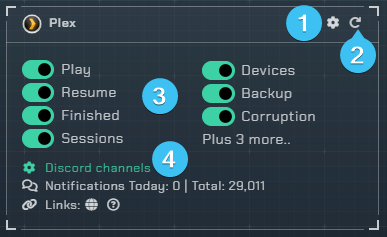
- Opens the integrations settings.
- Reloads the integration.
- Triggers
Play- When media starts playingDirect Play- Requires play enabled, sends notifications for direct play streamsSingle Transcode- Requires play enabled, sends notifications for single transcode streams (audio or video)Full Transcode- Requires play enabled, sends notifications for full transcode streams (audio and video)Resume- When media starts playing after being pausedFinished- When media stops playing, this uses the client to track plex sessions (do not use with Scrobble enabled)Scrobble- When media stops playing, this uses the plex webhook (requires Plex Pass)Rating- Notify when a user rates a movie/show (requires Plex Pass)New Item- Notify when a new item is added to plex (requires push notifications enabled in Plex and Plex Pass)Sessions- A snapshot of what is playing, transcoding, server info, etcNew Devices- Notify when a new device is added (requires push notifications and Plex Pass)Db Backup- Notify when a database backup was completed (requires push notifications and Plex Pass)Db Corruption- Notify when database corruption is detected (requires push notifications and Plex Pass)
- Discord Channels
- Channel(s) to use for sending plex notifications
Trigger notes
- Triggers marked with push notifications require push notifications enabled in the Plex settings (Server -> General)
- Delete and unmonitor features require valid Radarr/Sonarr connections in the local client
- Rating, New Item, Scrobble, New Devices, Db Backup, and Db Corruption triggers require the Plex Pass for webhooks
- Finished uses the client to track the Plex API; do not use with Scrobble enabled
Integration Settings Menu

Click the cog icon to open the integration settings for Plex.
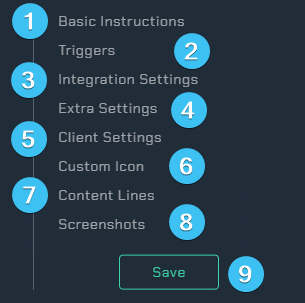
Basic Instructions- Gives you basic guidelines on how to setup this integration in the UI.Triggers- Adjust which webhooks will send notifications to you.Integration Settings- Allows the user to further configure the integration.Extra Settings- Adjust the extra settings for this integration.Client Settings- Allows the user to set the scanning interval.Custom Icon- Assign another icon to notifications from this integration. (Subscriber Feature)Content Lines- Add a message to the top of notifications for wearable/toast purposes.Screenshots- Shows the expected output once all correctly configured.Save- Saves all your Configured settings and closes the Integration Settings Menu.
Triggers
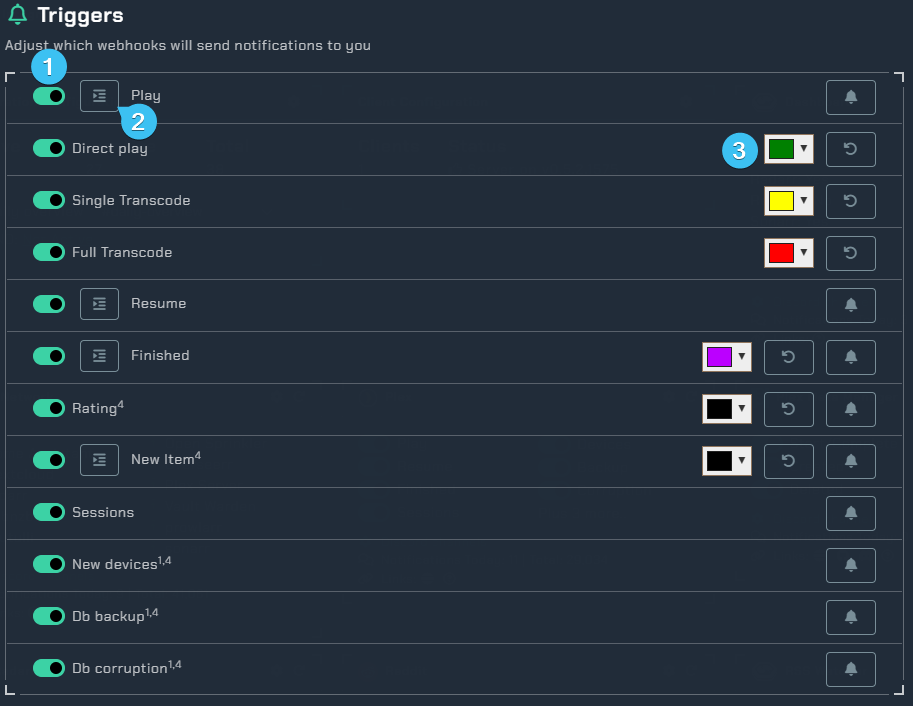
- Notification triggers.
- Notification fields - Select various fields to be displayed in the notification.
- Notification colors.
Integration Settings
Here you can adjust the settings for this integration.
User/Device
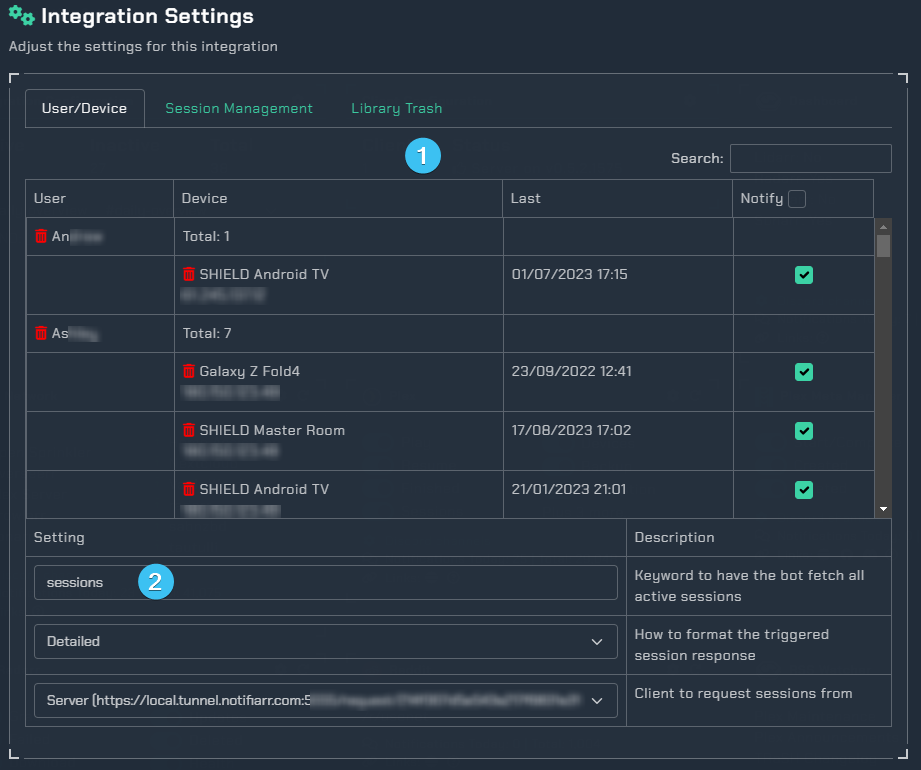
- Table of all users and devices. Uncheck the notify box to not receive notifications from the specific user/device.
- Keyword for having the bot display what is currently streaming on your server.
Session Management
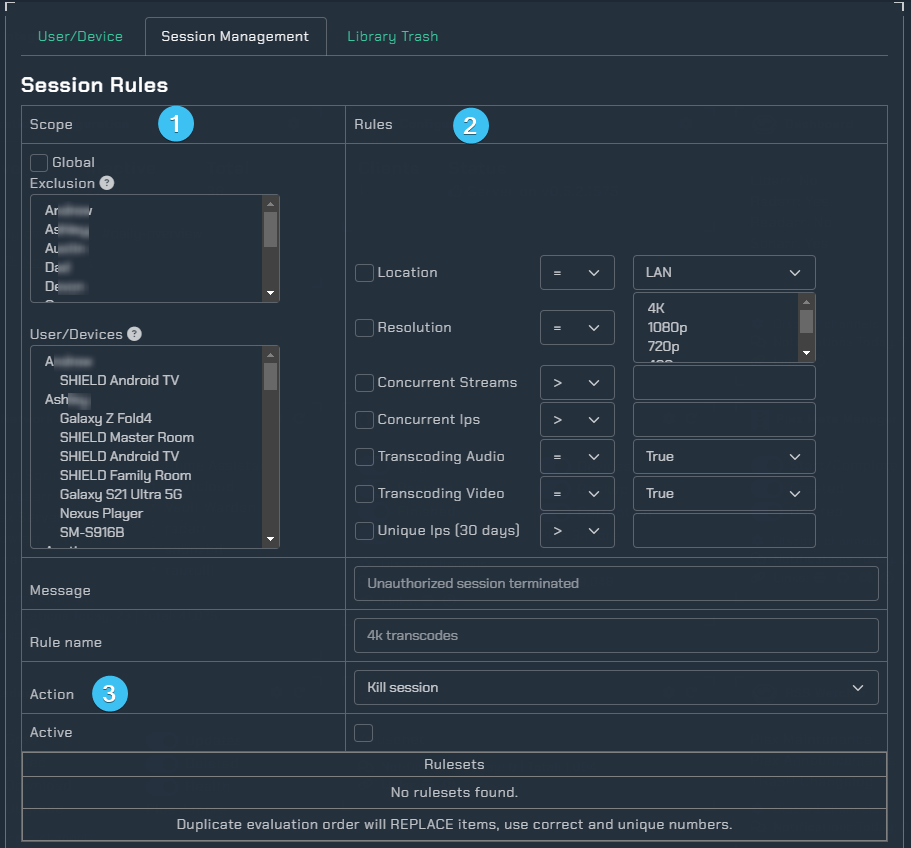
Scope- Kill all sessions from a given user/device (Maybe a user shared their login with someone else).Rules- Kill the session after rules have been met.Action- Notify when sessions are automatically killed.
Library Trash
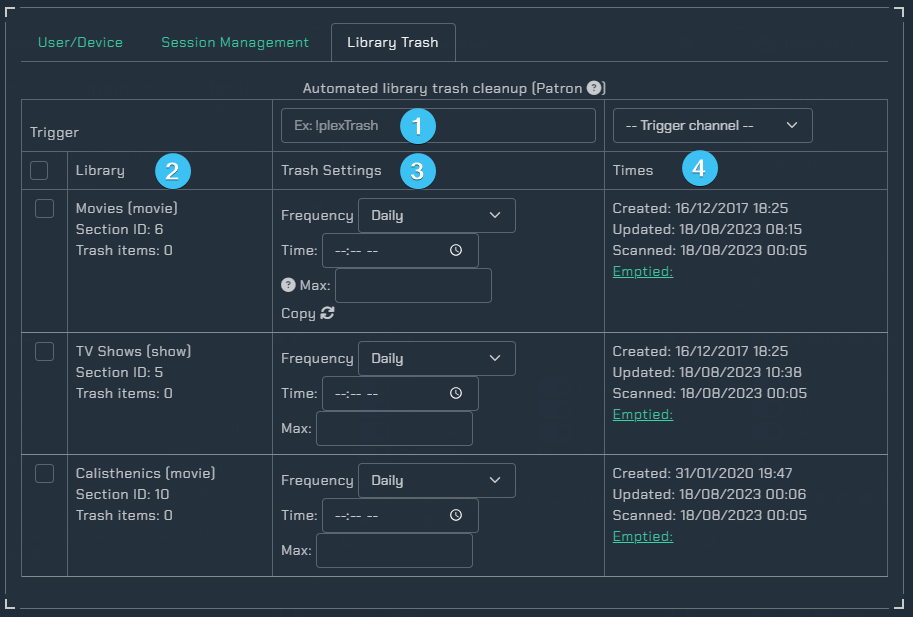
Note: You may see the following error when tab is loading: Error fetching plex library list. Ensure the client settings are saved and try again.
Trigger- Keyword to trigger a cleanup outside the set frequency and timeLibrary- Check which libraries you want the automated trash cleanupTrash Settings- The time and frequency of the automated cleanupFrequency- How frequently this should try to clear the trash.Time- What time of day this should try to clear the trash.Max- Do not empty if trash items is more than this number (in case of a drive failure for example).Copy- Copy applied settings to all libraries. Note: This only appears on the first listed library.
Times- The times for the library
Extra Settings
Additional settings such as automatically unmonitor an episode or movie once a user has watched it. You are able to select multiple users by holding down ctrl and highlighting the names. 
Item Ratings- How to display ratings when media is rated (plain text, stars, or stars with label)Split by Rating- Send notifications with selected content ratings to a separate channelUnmonitor movie on finish- Automatically unmonitor a movie after selected users finish watching in selected Radarr instances (Patron feature, requires finished/scrobble notifications enabled)Unmonitor episode on finish- Automatically unmonitor an episode after selected users finish watching in selected Sonarr instances (Patron feature, requires finished/scrobble notifications enabled)Delete movie & file on finish- Delete movie and file after selected users finish watching in selected Radarr instances (Patron feature, requires finished/scrobble notifications enabled)Delete movie file on finish- Delete only the movie file after selected users finish watching in selected Radarr instances (Patron feature, requires finished/scrobble notifications enabled)Delete episode on finish- Delete episode after selected users finish watching in selected Sonarr instances (Patron feature, requires finished/scrobble notifications enabled)Delete delay- How long to wait after the finished notification before deleting, in minutes (Patron feature)Delete exclusions (TMDb)- TMDb IDs to exclude from automatic movie deletion, separated by commas (Patron feature)Delete exclusions (TVDb)- TVDb IDs to exclude from automatic episode deletion, separated by commas (Patron feature)Library exclusion- Ignore notifications from specific libraries
Client Settings
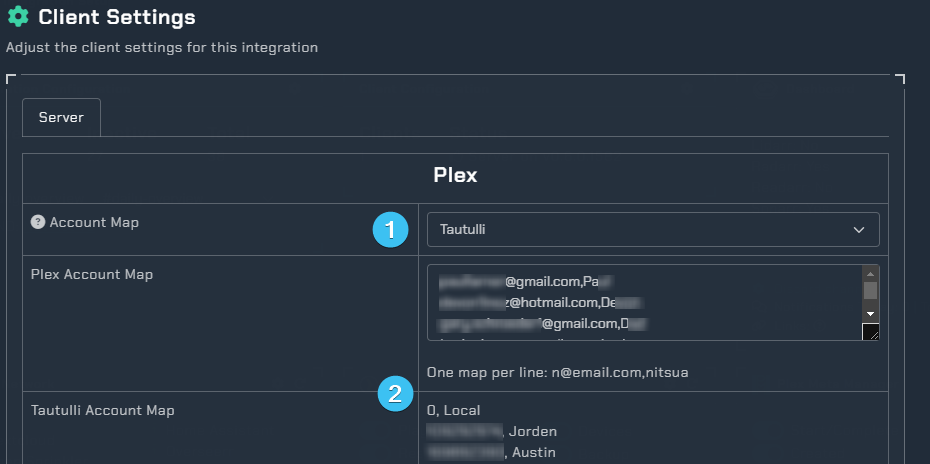
Account Map- This will map user emails in your notifications to a user friendly name.
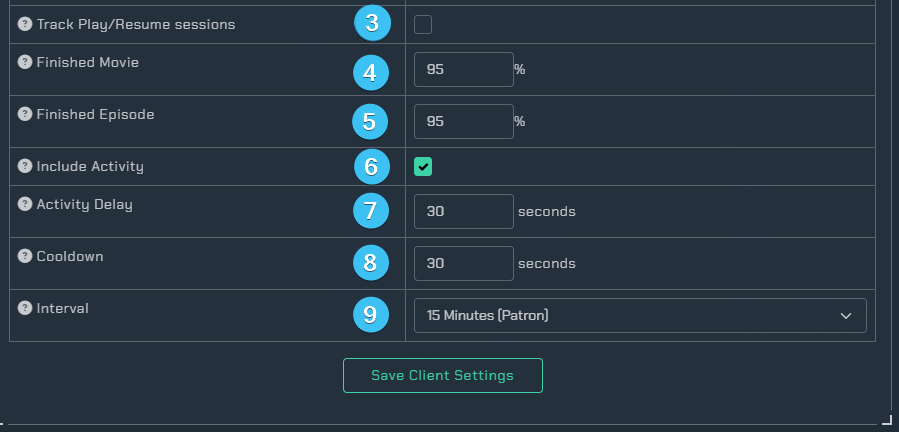
Plex and Tautulli Account Map- Examples of mapped accounts.Track Play/Resume sessions- Check this if you want to get Play/Resume notifications but do not have a Plex Pass.Finished Movie- This is a percentage setting for when to send a finished playing movie notification, 0 to disable, 70 min and 95-98 suggested.Finished Episode- This is a percentage setting for when to send a finished playing episode notification, 0 to disable, 70 min and 95-98 suggested.Include Activity- This is a used to send speed, transcode, container, etc information in plex notifications.Activity Delay- This is how long to wait after media is started before getting the session, at least 10-12 seconds is needed.Cooldown- Minimum time between notifications to ensure duplicates are not sent (such as media.play and playback.started)Interval- This is how often to send a notification for the Plex Sessions trigger, nothing sends if there is no media playing or paused.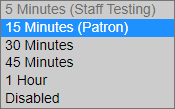
Custom Icon
Assign another icon to notifications from this integration (Subscriber Feature) 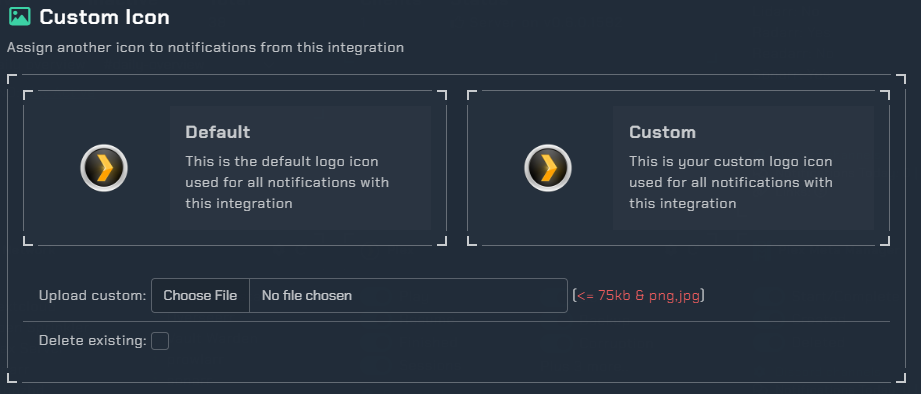
Content Lines
Content lines are small previews of the full notification for toast/push notifications. Great for wearables. 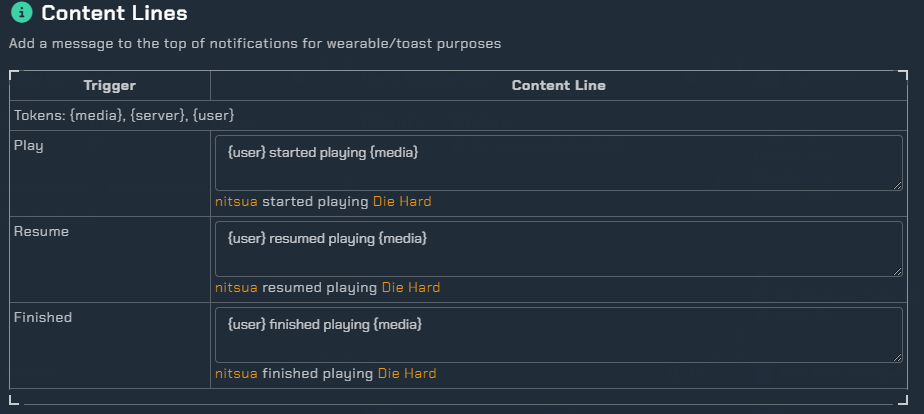
Instructions
This integration requires the Notifiarr client to be running locally. You can get it from Github. After installing, you need to setup plex in the UI. An example is

- The name for Plex comes from Plex and cannot be changed here. There is no automatic way to add a service check to Plex. If you want service checks, add one for it in Service Checks.
http://orhttps://URL for the application instance. If your application has a Base URL, include it. Providing an https:// URL reveals a checkbox. Checking this box enables SSL certificate validation; invalid certificates generate an error.- Your Plex Token you may find directions for locating your Plex token at this Plex Article.
- This controls the maximum duration a request to this application may elapse. Selecting No Timeout can be dangerous. Selecting Disabled completely disables the instance.
Webhook
Info
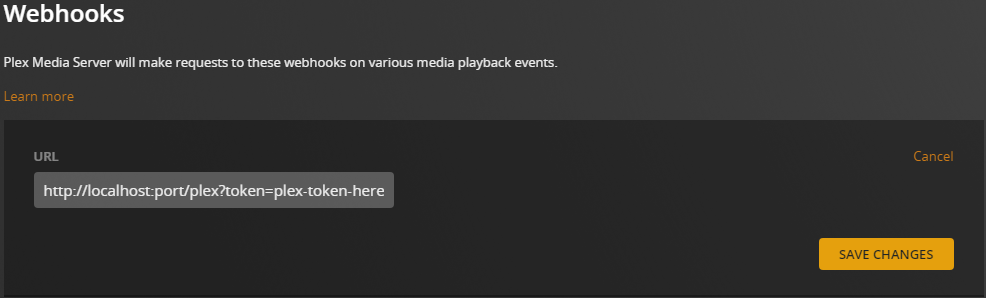
Plex Webhooks from Plex to the Client require Plexpass
In Plex, add a webhook that points to http://localhost:port/plex?token=plex-token-here
- Replace
localhost:portwith theip:portto the Notifiarr client - Replace
plex-token-herewith the token for Plex so the Notifiarr client allows the incoming connection