MDBList
What is MDBList
MDBList is a 3rd party service that allows you to curate lists of shows and movies from various sources and can be found here, this integration is meant to do three things:
- Allow for the ability to add individual shows or movies to Radarr or Sonarr using the add button on the show item on the MDBList website
- Sync lists created on MDBList into Sonarr and Radarr automatically
- Sync a list of IDs from your local collection to MDBList which can be used within the filtering of a list, to exclude, for example, all collected shows or movies
Prerequisites
- Notifiarr setup and working with Discord, Sonarr, and Radarr integrations
- Account with MDBList
- API key created on the Notifiarr website and assigned for use with MDBList, this can be generated and found in your profile, under the API Keys section
- On MDBList, go to Preferences → Notifiarr, paste the API key allocated to the MDBList integration, and enable “Automatically add lists to Radarr (if configured in Notifiarr)”
Trigger options
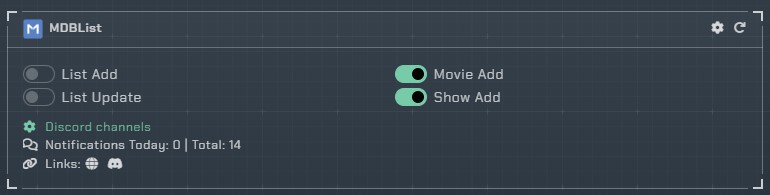
List Add- Receive a notification when MDBList sends a new list to add to the starr appsList Updates- Receive a notification when MDBList sends an updated list to add to the starr appsAdd Movie- Receive a notification when a movie is added from the MDBList websiteAdd Show- Receive a notification when a show is added from the MDBList website
Each trigger has notification color and notification ping settings.
Steps to configure integration
- From within the Notifiarr website add the MDBList integration
- Configure your Discord channels
- Enable the triggers you want (e.g.
Add MovieandAdd Show) by enabling the toggles as shown below.
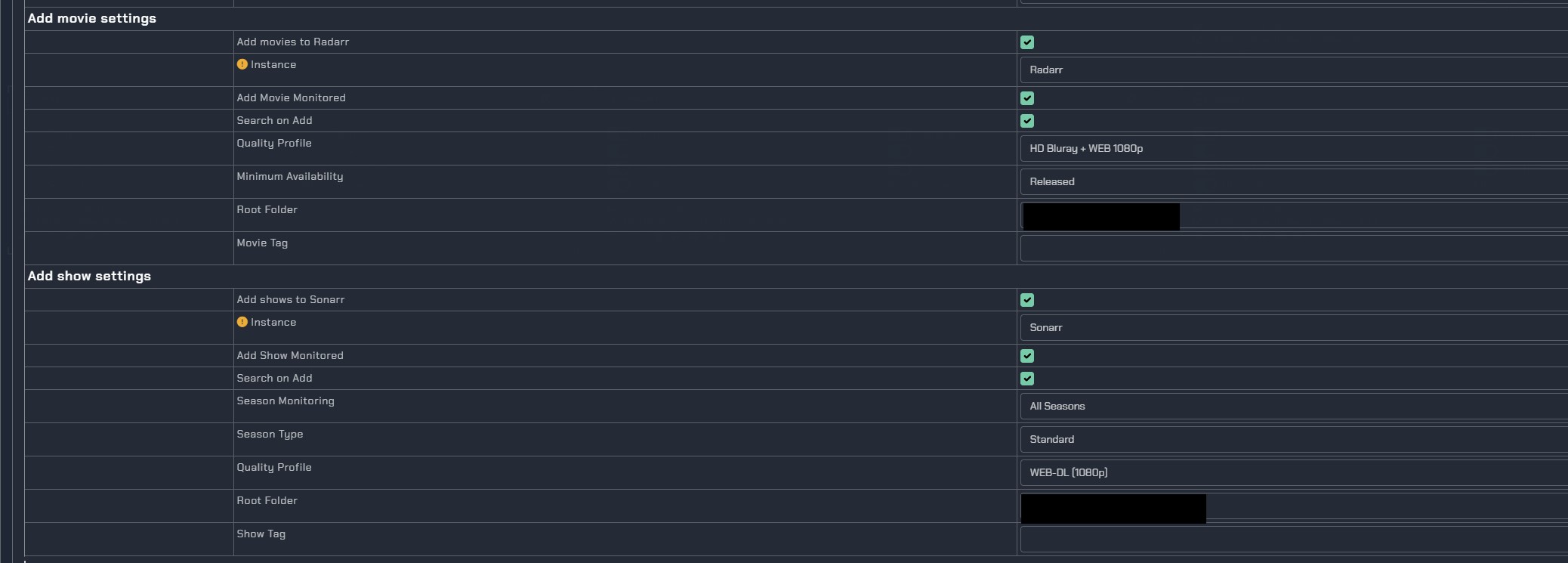
We now need to configure some additional settings from within the integration, to tell Notifiarr what settings to use when adding a movie or show.
Configuration
Note
Currently you cannot send things (movies, shows, lists) to different instances and you cannot have different settings per instance. This is a limitation on the side of MDBList.
The configuration has five tabs:
Radarr lists
Settings for adding MDBList lists to Radarr.
Add lists to Radarr- Enable/disable adding lists to RadarrInstance- Which Radarr instance to use (save and reopen after changing to update quality profile and root folder)Enable Automatic Add- Automatically add items from listsAdd Movies Monitored- Add movies as monitoredSearch on Add- Search for movies when addedMinimum Availability- Released, In Cinemas, or AnnouncedQuality Profile- Quality profile to use from RadarrRoot Folder- Root folder path from RadarrList Tags- Comma-separated tags to apply to list items
Radarr movies
Settings for adding individual movies from the MDBList website to Radarr.
Add movies to Radarr- Enable/disable adding movies to RadarrInstance- Which Radarr instance to useAdd Movie Monitored- Add movie as monitoredSearch on Add- Search for movie when addedQuality Profile- Quality profile to use from RadarrMinimum Availability- Released, In Cinemas, or AnnouncedRoot Folder- Root folder path from RadarrMovie Tag- Tag to apply to movies
Sonarr lists
Settings for adding MDBList lists to Sonarr.
Add lists to Sonarr- Enable/disable adding lists to SonarrInstance- Which Sonarr instance to useEnable Automatic Add- Automatically add items from listsAdd Series Monitored- Add series as monitoredSearch on Add- Search for series when addedSeason Monitoring- All Seasons, Latest Season, Future Seasons, or NoneSeason Type- Daily, Standard, or AnimeQuality Profile- Quality profile to use from SonarrRoot Folder- Root folder path from SonarrShow Tag- Tag to apply to list items
Sonarr shows
Settings for adding individual shows from the MDBList website to Sonarr.
Add shows to Sonarr- Enable/disable adding shows to SonarrInstance- Which Sonarr instance to useAdd Show Monitored- Add show as monitoredSearch on Add- Search for show when addedSeason Monitoring- All Seasons, Latest Season, Future Seasons, or NoneSeason Type- Daily, Standard, or AnimeQuality Profile- Quality profile to use from SonarrRoot Folder- Root folder path from SonarrShow Tag- Tag to apply to shows
Library sync (Patron)
Sync your local library information to MDBList for better filtering.
Sync Radarr information- Send a list of movies you have for better filtering (only the TMDb ID and download status is sent)Sync instance- Which Radarr instance to syncSync Sonarr information- Send a list of shows you have for better filtering (only the TVDb ID and download status is sent)Sync instance- Which Sonarr instance to syncIgnore list add warning- Suppress warnings when lists cannot be added