Crowdsec
Note
This integration allows webhook notifications for crowdsec
Trigger options
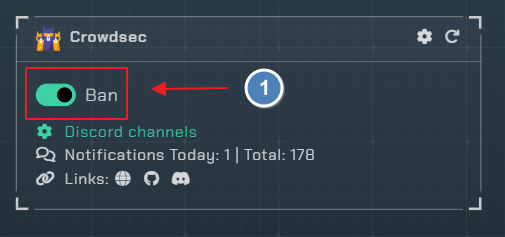
Ban- Be notified of any bans that occur
Click the cog icon to open the configuration settings

Instructions
- you will need to edit your
/etc/crowdsec/notifications/http.yamlfile to look like this
type: http          # Don't change
name: notifiarr  # Must match the registered plugin in the profile
log_level: info # One of "trace", "debug", "info", "warn", "error", "off"
format: |
  {{ .|toJson }}
url: https://notifiarr.com/api/v1/notification/crowdsec
method: POST # Any of the http verbs: "POST", "GET", "PUT"...
headers:
  Content-Type: application/json
  x-api-key: YOUR_APIKEY_HERE
make sure to replace YOUR_APIKEY_HERE with either your global API KEY or, as recommended, an API KEY created specifically for Crowdsec.
you will register notifiarr in the profiles.yaml in your crowdsec directory
name: default_ip_remediation
filters:
 - Alert.Remediation == true && Alert.GetScope() == "Ip"
decisions:
 - type: ban
   duration: 4h
notifications:
  - notifiarr
on_success: break
Crowdsec Notifications
- Please refer to Crowdsec-Notifications for issues with setup
Configuration
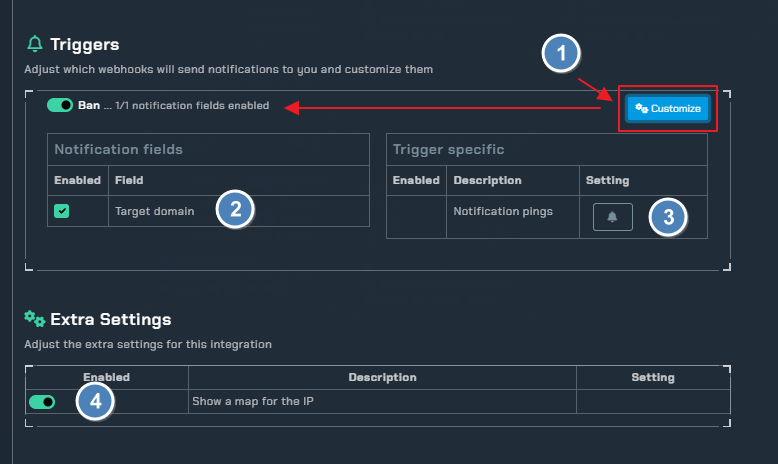
- Click the
Customizetoggle to show all available options for theBantrigger - All available
notification fields - Use this to ping a role/user when a ban occurs
Show a map for the IP- include a geo-located map image of the offending IP in the notification
Examples
| appsec example | http example |
|---|---|
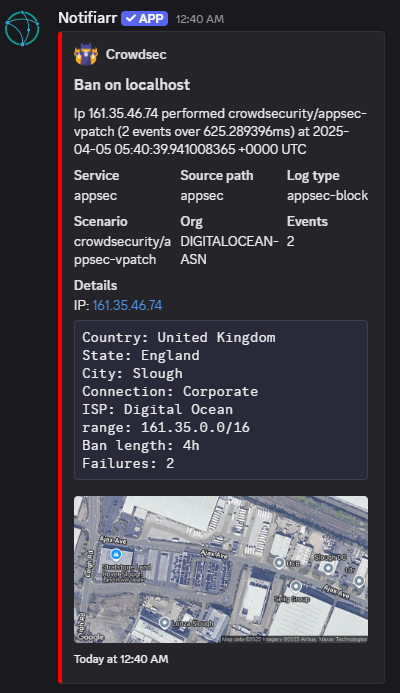 | 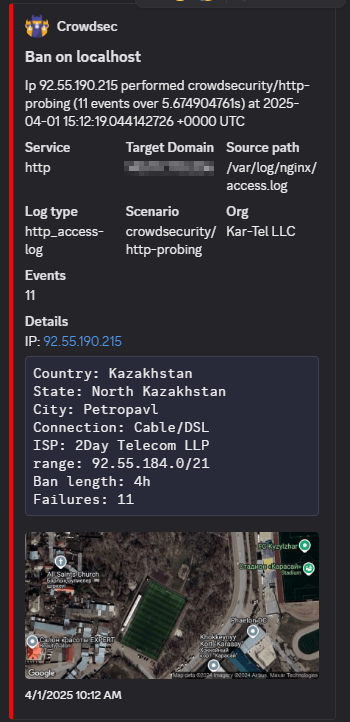 |