Notifiarr Client Cloudflare Proxy
Danger
None of this is required or necessary. We recommend NOT exposing your Notifiarr client to the Internet at all. In other words, don't do any of this. But you can if you want to access your local Notifiarr Client from the Internet.
Some users use Cloudflare's "Cloudflare Tunnel" feature or additional Cloudflare security features to provide protected external access to their Notifiarr Client and other services. Specific configuration required for Cloudflare's various options are detailed below.
Cloudflare Tunnel
Info
This assumes that you already have a Cloudflare Tunnel set up on your system. If you want to get started with Cloudflare Tunnels follow this YouTube guide first: Cloudflare Tunnel: Creating Tunnels via GUI - Bypass CG-NAT by IBRACORP
- Login to your Cloudflare teams account at one.dash.cloudflare.com
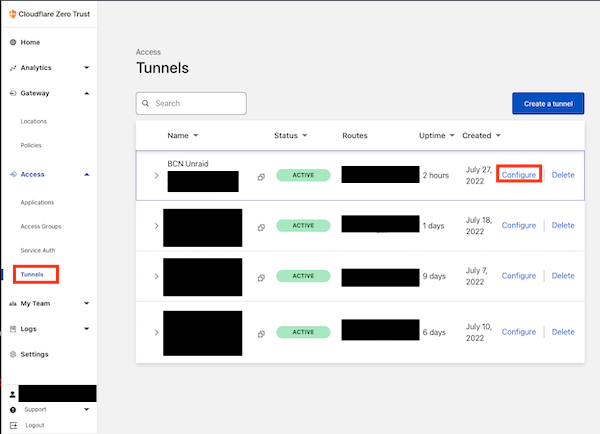
- Click Tunnels and then configure next to the Cloudflare Tunnel you would like to use.
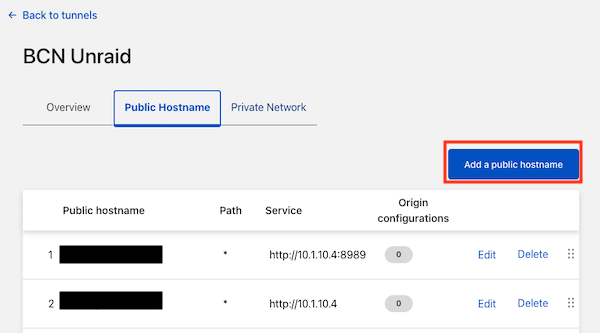
- In your Tunnel section click on Public Hostname and add a new hostname by clicking on Add a public hostname.
- Fill in the public hostname information on the next screen.
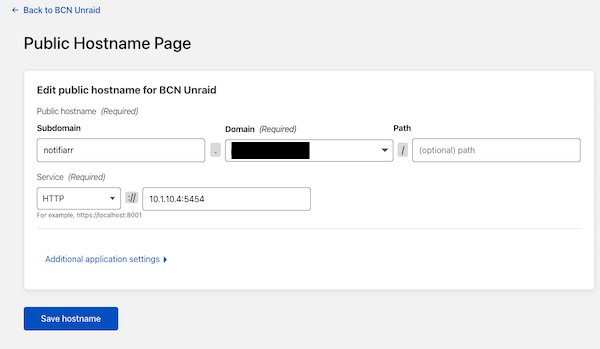
Subdomain: Notifiarr (or whatever else you want it to be)Domain: choose one of your domainsService: HTTP + Your Local IP Address for Notifiarr
Save your host name settings, that's it! Your client is now exposed to the Internet!
Cloudflare WAF / ZeroTrust
If you use Cloudflare WAF rules or ZeroTrust to protect your Notifiarr client, you must ensure that the Notifiarr.com website can still communicate with the client's /api path.
The client communicates with https://notifiarr.com and the website communicates back through the Site Tunnel (websocket). If you expose your client directly through Cloudflare and have WAF or ZeroTrust rules, create a bypass rule or application policy that allows requests from the Notifiarr.com servers to reach the /api path on your client's domain.
Site Tunnel
The recommended approach is to use the built-in Site Tunnel feature instead of exposing the client to the Internet. The Site Tunnel creates a persistent websocket connection from the client to notifiarr.com, so no inbound port or firewall rules are needed. Configure this on the Settings => Site Tunnel page in the client Web UI.